 Bloomz
Bank and redeem your Civic Rewards points
Check your banked Civic Rewards points and redeem them against your city's local offers — discounts and perks from participating businesses and organizations. You need a Bloomz account and membership in a group that has Civic Rewards turned on.
Before you start
Your City (or school) must have Civic Rewards turned on. You need to be signed in and a member of that group — points are awarded to you by city staff, not something you request.
Step 1 — Open Civic Rewards
From your group, select Civic Rewards in the top bar or More menu.
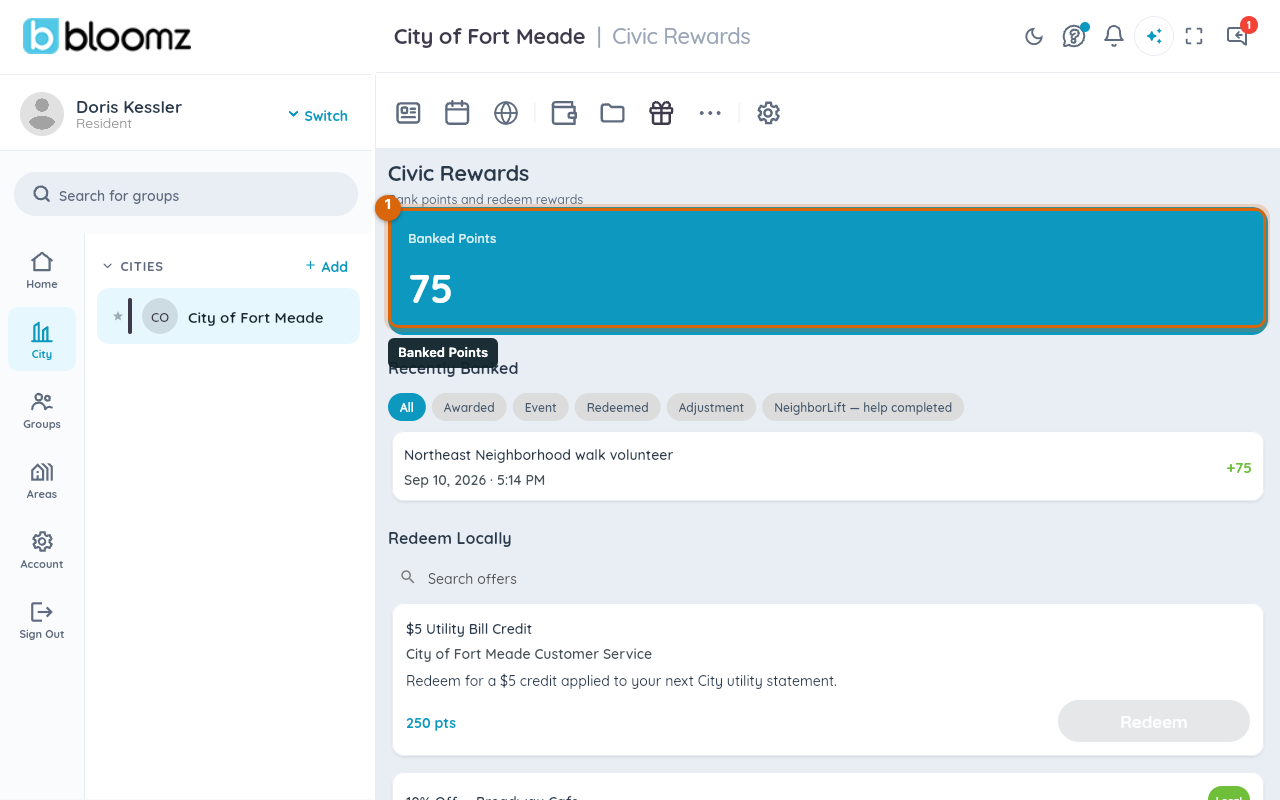
Your Banked Points balance sits at the top, with Recently Banked showing how you earned each batch (an award, an event, an adjustment, or a Neighbor Help completion) — this is also the only place you'll learn points were awarded, since Bloomz doesn't send a notification for it.
Step 2 — Browse Redeem Locally
Select Redeem Locally (or Redeem Rewards on a school) to see the offer catalog — each card shows the business, a description, and its points cost; a Local badge marks a local-business offer. Search offers if the list is long, and only offers marked Active by your city appear here at all.
Step 3 — Redeem an offer
Select an offer, then Redeem. Bloomz shows how many points it'll use and your remaining balance after — confirm to redeem. Your balance updates immediately and the offer moves into your own redemption history.
Step 4 — Use your redemption code
You'll get a Redemption Code — show or read this to the business or organization to claim the offer. Keep it handy until you've actually used it; redeeming in the app doesn't automatically notify the business, so you're the one presenting proof of the redemption.
Watch out: an offer marked Sold Out or past its redemption limit can't be redeemed even if you have enough points — check back later, or ask your city if they plan to restock it.
What city staff see
Redeeming an offer doesn't notify anyone at your city either — staff see redemption activity only when they open Report on the Civic Rewards admin hub (see Set up Civic Rewards offers and award points), not as an alert. If you're relying on staff to know you redeemed something right away, tell them directly — the app itself won't. The business or organization on the other end of the offer doesn't get anything from Bloomz automatically either — showing or reading them your redemption code is genuinely how the whole loop closes.
Related
- Set up Civic Rewards offers and award points
- Ask for help or offer to help a neighbor
- Manage City Features and Permissions