 Bloomz
Bill Extended Day families automatically
Link an Extended Day program to a billing plan template and Bloomz runs the money loop hands-off: every student who joins the program's roster gets their own recurring billing plan minted from the template, invoices post and autopay charges run on the nightly billing sweep, and a student who leaves the roster has that program's plan paused — never cancelled, and never any of the family's other school plans.
Before you start
- You need Payments turned on for your school and Extended Day set up.
- Billing is per-student and keyed to the school, created from a billing plan template — the same template library the billing plan wizard uses. Create the template (name, frequency, line items) first if you don't have one.
Step 1 — Pick the template on the program's setup screen
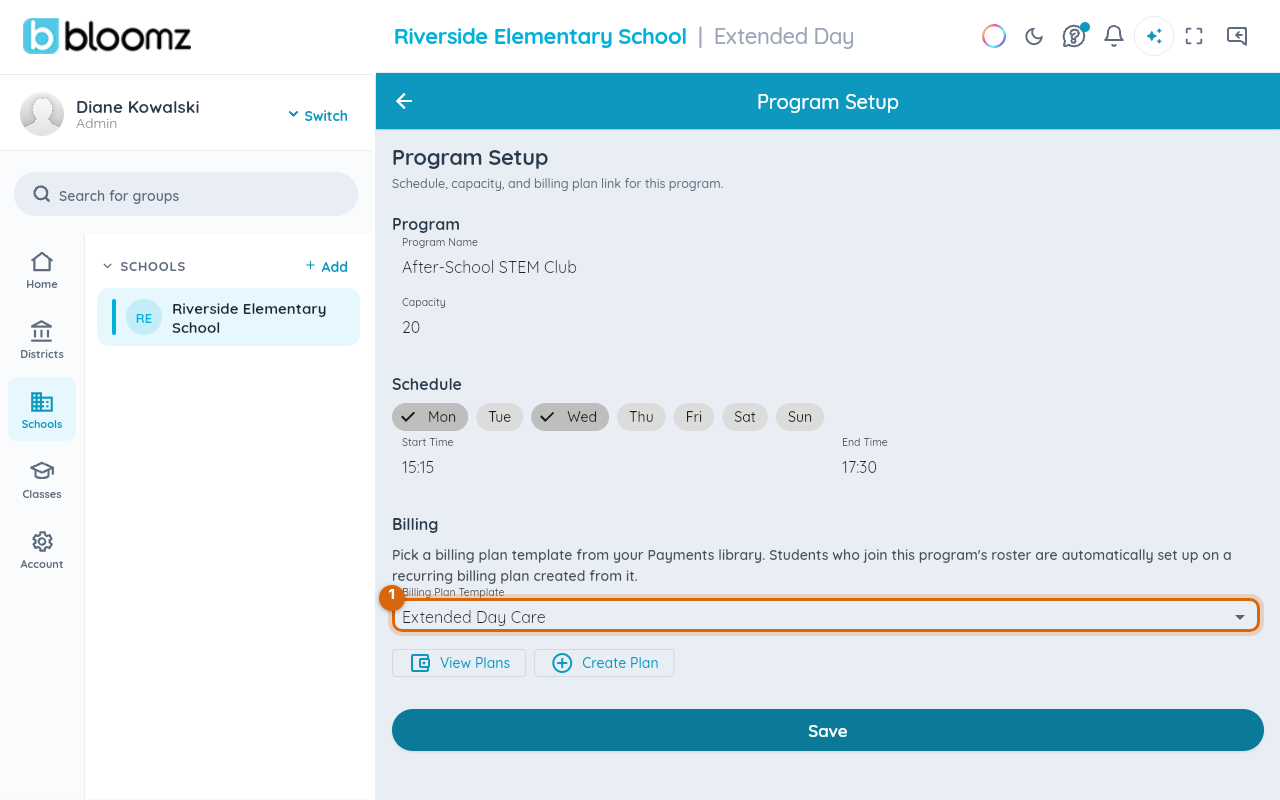
On the Extended Day setup screen's billing section, choose a template from the Billing Plan Template dropdown. No Automatic Billing leaves the program unbilled.
Step 2 — Enroll students as usual
Nothing extra to do: adding a student to the program's afterschool class (one at a time or in bulk) mints their recurring plan from the template. Enrolling the same student twice never double-bills, and a student who left earlier and rejoins has their paused plan resumed rather than duplicated.

The first invoice posts on the next nightly billing run; the plan's due day defaults to today's day of the month (capped at the 28th), and autopay is not required unless the family sets it up.
Step 3 — Watch the billing activity feed
When a student leaves the program's roster, only the plan created from that program's template is paused — tuition and every other school plan keeps running — and a Plan paused entry naming the program lands in the school's billing activity feed so the change is visible, never silent.

Watch out: linking a template does not backfill students who were already on the roster before the link — enrollment going forward is what mints plans. For an existing roster, use the billing plan wizard's bulk step (it creates the same plans from the same template). Also, a legacy program that stored a raw plan id from before template linking shows it as Linked plan (not a template) in the dropdown — that value is inert and creates no plans.
What families see
Families see the recurring plan, its invoices, and any autopay charges in their normal school-fees view, exactly like any other billing plan — nothing labels it differently because it came from Extended Day enrollment.