 Bloomz
Split a bill between two payers
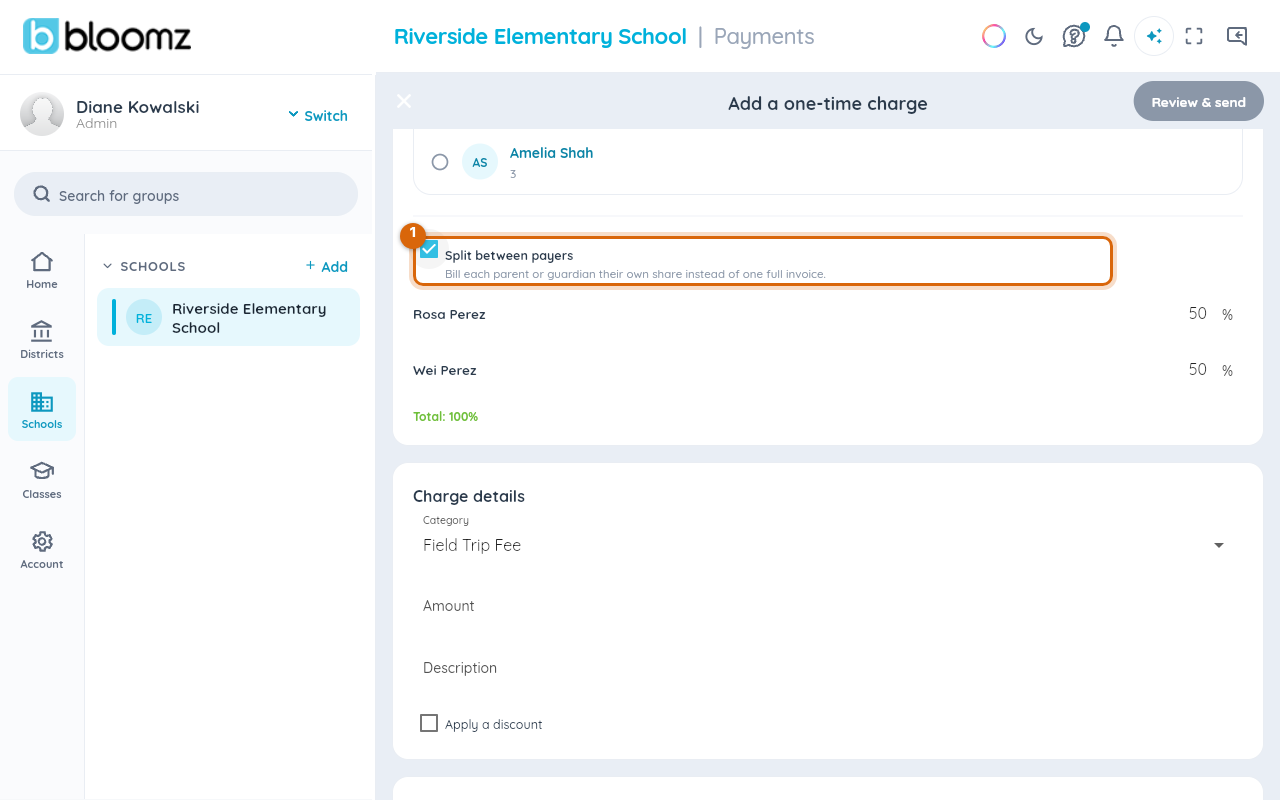
When two guardians share the cost of a fee, the school splits the charge between you when they bill it — each of you then owes only your own portion, pays with your own method, and gets your own receipt.
Before you start
- Splitting a bill needs a second guardian on file for the student — invite one first if you haven't (see Invite a co-parent or another guardian).
- The split is set up by the school office when they create the charge or the billing plan — there is no split button on the family side. To split a fee, ask the school office.
- Once a charge is split, both shares are billed independently — paying your share does not pay theirs.
Step 1 — Ask the school to split the charge
Contact the school office — a Bloomz message works well — and tell them which fee you want shared and in what proportion. Splitting is part of how they create the charge, so an existing unsplit bill is typically replaced with two split ones.
Step 2 — The school sets each guardian's share
When the office adds the charge (or sets up the billing plan), they pick the student's guardians and set each one's share — the shares always add up to the full amount.

Step 3 — Each of you sees and pays your own share
Each guardian sees only their own portion as an open item in their own Payments area and pays it with their own saved method — you never see the other guardian's payment details, and they never see yours. Autopay is separate per guardian too.
Watch out: your share keeps the original due date — the other guardian paying late (or not at all) doesn't change what you owe or when.
Related
- Pay a school fee
- Set up a tuition agreement and autopay
- Invite a co-parent or another guardian
- Download a statement or receipt (PDF)