 Bloomz
Sign a form
Some forms — a permission slip, a policy acknowledgment, a handbook receipt — need your signature, not just your answers. You sign it the same way you fill out the rest of the form, right before you submit.
Before you start
You'll only see a signature step if the form's creator turned on Requires Signature? for that form — most forms don't need one. You choose how to sign each time; it isn't a setting you pick once.
Step 1 — Answer the form as usual
Open the form and work through its questions. The signature step appears at the end, just before Submit. The form still submits in the same order you're used to — signing is the last thing you do, not a separate errand.
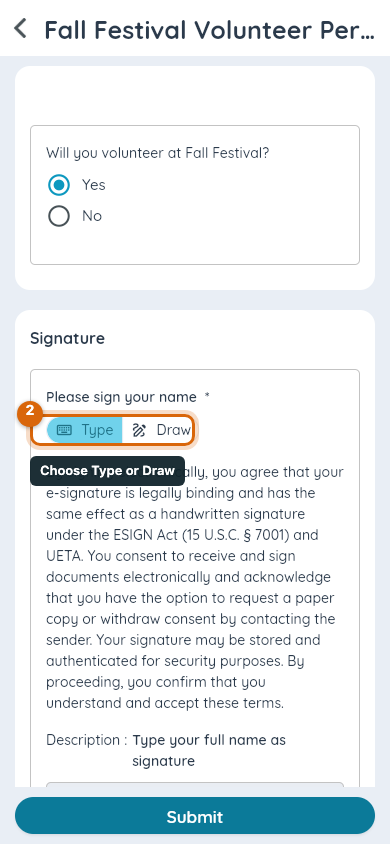
Step 2 — Choose Type or Draw
Choose Type to type your full name as your signature, or Draw to sign with your finger or a mouse. Either mode produces the signature Bloomz stores with your response — neither is more official than the other.
Step 3 — Sign
If you typed: enter your full name in the signature field.
If you drew: sign in the pad. Choose Clear if you want to start your signature over before submitting.
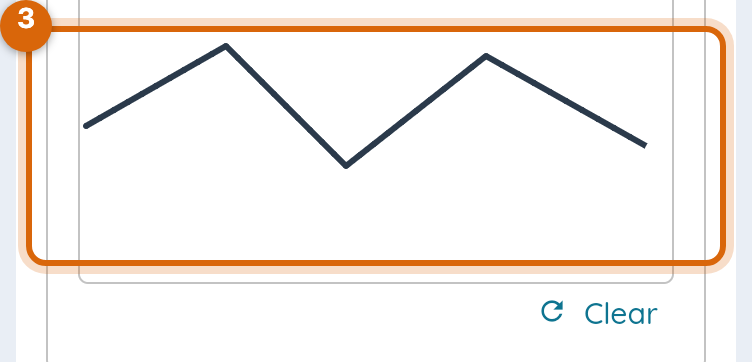
The signature field fills in with your name or drawing, and Submit becomes available.
Step 4 — Submit
Select Submit. Your signature is saved with your response — you can't change it afterward, the same way the rest of a submitted form can't be edited.
Watch out: an e-signature here is legally binding, the same as a handwritten one — Bloomz tells you this on the signature step itself before you sign.
What the form's reader sees
The teacher or admin who built the form sees your signature attached to your answers the moment they open your response, not as a separate download: opening your response in the form's Responses ▸ Individual view shows the drawn or typed signature alongside your other answers. A response that was submitted before Requires Signature? was turned on, or from a very old version of the app, shows no signature line at all rather than a blank one.
Related
- Fill out and submit a form
- Ask families to sign a form
- Send a form to families