 Bloomz
Put one sign-up sheet on several class calendars
If you teach more than one class, a single Volunteer Help sheet can post to every class at once, sharing one pool of slots — no need to build a duplicate sheet per class.
Before you start
This works for any event type — Volunteer Help, a general event, or Conferences/Office Hours — as long as you have a teaching role on more than one class. The classes share one set of slots: once a slot is taken from any class, it's gone everywhere.
Step 1 — Start creating the sign-up sheet
Open one of your classes, select the Calendar tab, then + Event, and choose the event type you want under Planning.
Step 2 — Find the class calendar picker
As you set up the event, look for the calendar selector near the top of the form — it shows which class the event is being created on.
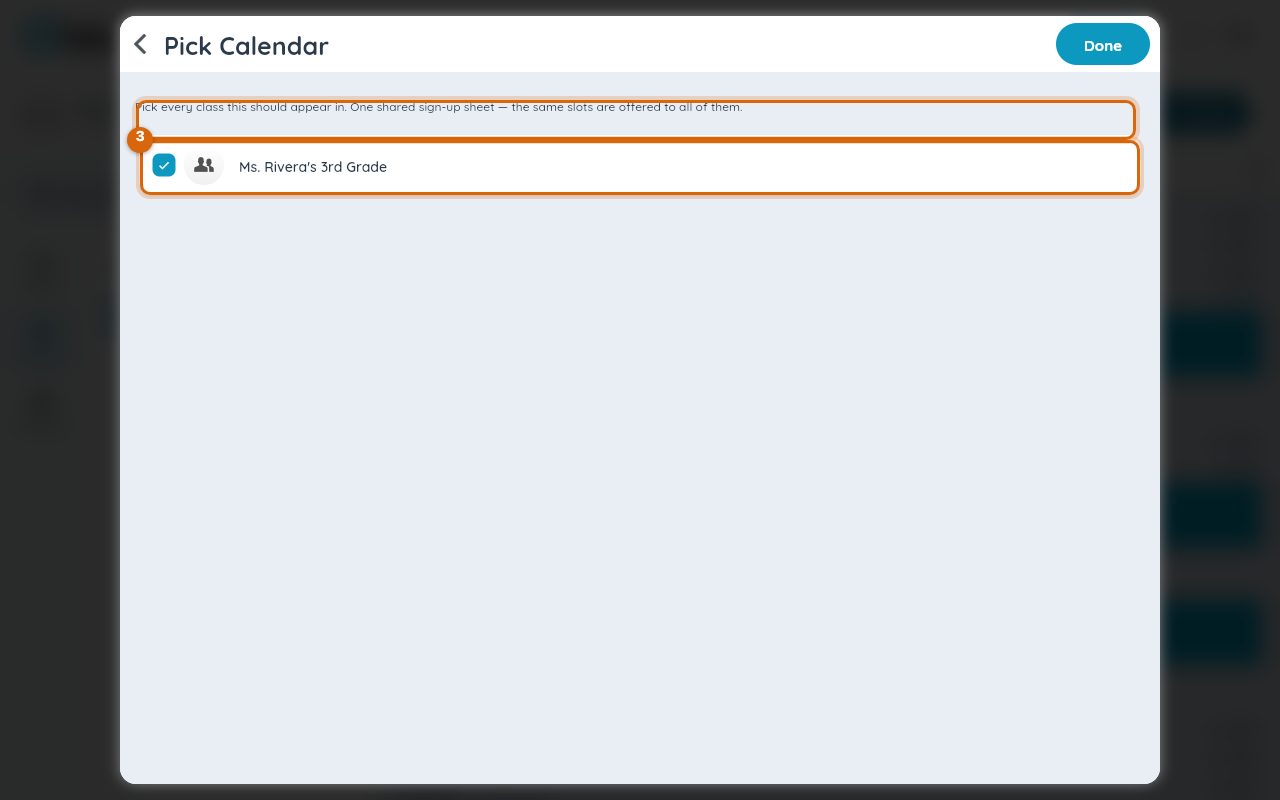
Step 3 — Check every class it should appear on
Select the calendar field to open the picker. It switches into checkbox mode; check every class the sign-up should post to, not just the one you started from.

Step 4 — Confirm your selection
Select Done in the top bar. It stays greyed out until you've checked at least one class.

Step 5 — Finish and save
Complete the rest of the sheet — tasks, slots, dates — and save as usual. The sheet appears on every class calendar you checked, and every family across those classes sees the same live slot counts.
Watch out: because the slot pool is shared, a burst of sign-ups from one class can fill the sheet before another class's families see it. If you want each class to have its own guaranteed slots, create separate sheets instead of a shared one.
Related
- Create a volunteer sign-up sheet
- Limit sign-ups per person
- Set a sign-up cutoff date, or close sign-ups early